RAG是一种先进的自然语言处理方法,它结合了信息检索和文本生成技术,用于提高问答系统、聊天机器人等应用的性能。以下是RAG的详细工作流程:
RAG 的工作流程RAG的工作流程文档加载(Document Loading)从各种来源加载大量文档数据。这些文档将作为知识库,用于后续的信息检索。文档分割(Document Splitting)将加载的文档分割成更小的段落或部分。这有助于提高检索的准确性和效率。嵌入向量生成(Embedding Generation)对每个文档或文档的部分生成嵌入向量。这些嵌入向量捕捉文档的语义信息,方便后续的相似度比较。写入向量数据库(Writing to Vector Database)将生成的嵌入向量存储在一个向量数据库中。数据库支持高效的相似度搜索操作。查询生成(Query Generation)用户提出一个问题或输入一个提示。RAG模型根据输入生成一个或多个相关的查询。文档检索(Document Retrieval)使用生成的查询在向量数据库中检索相关文档。选择与查询最相关的文档作为信息源。上下文融合(Context Integration)将检索到的文档内容与原始问题或提示融合,构成扩展的上下文。答案生成(Answer Generation)基于融合后的上下文,RAG生成模型产生最终的回答或文本。这一步骤旨在综合原始输入和检索到的信息。准备环境向量数据库环境已经通过百度向量数据库测试申请的才能访问创建,地址:https://cloud.baidu.com/product/vdb.html
1、创建百度向量数据库实例,注意需要地域,可用区需要和 BCC 保持在同一个 VPC 内。 地址:https://console.bce.baidu.com/vdb/#/vdb/instance/create

2、创建成功后,通过实例详情页查看访问的地址信息和账号信息,用于访问操作向量数据库。如例子截图,访问信息如下:
# 访问地址格式:http://${IP}:${PORT}访问地址:http://192.168.20.4:5287账号:root密钥:xxxx
 开通千帆 Embedding 模型
千帆模型开通付费之后才能使用,开通不会产生费用,且有代金券赠送
1、开通千帆 Embedding 模型的收费,地址: https://console.bce.baidu.com/qianfan/chargemanage/list

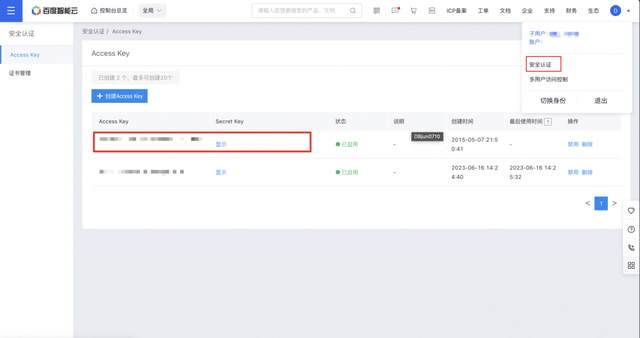
2、右上角个人中心的安全认证里面提取用于鉴权调用 Embedding 模型的 Access Key 和 Secret Key
 客户端环境数据准备和写入
本例子使用的是 bcc 计算型 c5 2c4g 实例基于 Centos 系统作为例子,但不仅限于 bcc,只要是同 vpc 内的服务器产品都可以。已经有 BCC 客户端的用户忽略步骤 1。
1、创建 BCC 客户端。 地址:https://console.bce.baidu.com/bcc/#/bcc/instance/create

2、登录创建的实例进行环境准备,部署安装 python 环境和搭建知识库所必须的依赖包,
# 安装 python 3.9yum install -y python39# langchain 依赖包,用于把文本数据转化为向量数据。pip3.9 install langchain# pymochow 依赖包,用于访问和操作百度向量数据库。pip3.9 install pymochow# qianfan 依赖包,用于访问千帆大模型。pip3.9 install qianfan# pdfplumber 依赖包,加载除了 pdf 文档。pip3.9 install pdfplumber# 创建项目目录mkdir -p knowledge/example_data && cd knowledge3、上传一个 PDF 文件到 knowledge/example_data 目录下
4、创建访问的配置文件
# config.pyimport osfrom pymochow.auth.bce_credentials import BceCredentials# 定义配置信息account = 'root'api_key = '修改为你的密钥'endpoint = '修改为之前记录的访问地址,如 http://192.168.20.4:5287'# 初始化BceCredentials对象credentials = BceCredentials(account, api_key)# 设置千帆AI平台的安全认证信息(AK/SK),通过环境变量# 注意替换以下参数为您的Access Key和Secret Keyos.environ["QIANFAN_ACCESS_KEY"] = "your_iam_ak"os.environ["QIANFAN_SECRET_KEY"] = "your_iam_sk"5、创建 document 数据库
import pymochowfrom pymochow.configuration import Configurationimport config # 导入配置文件config_obj = Configuration(credentials=config.credentials, endpoint=config.endpoint)client = pymochow.MochowClient(config_obj)try: db = client.create_database("document")except Exception as e: # 捕获所有类型的异常 print(f"Error: {e}") # 打印异常信息db_list = client.list_databases()for db_name in db_list: print(db_name.database_name)client.close()6、创建 chunks 数据表
import timeimport pymochow # 导入pymochow库,用于操作数据库from pymochow.configuration import Configuration # 用于配置客户端import config # 导入配置文件,包含身份验证和终端信息# 导入pymochow模型相关的类和枚举类型from pymochow.model.schema import Schema, Field, VectorIndex, SecondaryIndex, HNSWParamsfrom pymochow.model.enum import FieldType, IndexType, MetricType, TableStatefrom pymochow.model.table import Partition# 使用配置文件中的信息初始化客户端config_obj = Configuration(credentials=config.credentials, endpoint=config.endpoint)client = pymochow.MochowClient(config_obj)# 选择或创建数据库db = client.database("document")# 定义数据表的字段fields = [ Field("id", FieldType.UINT64, primary_key=True, partition_key=True, auto_increment=False, not_null=True), Field("source", FieldType.STRING), Field("author", FieldType.STRING, not_null=True), Field("vector", FieldType.FLOAT_VECTOR, dimension=384)]# 定义数据表的索引indexes = [ VectorIndex(index_name="vector_idx", field="vector", index_type=IndexType.HNSW, metric_type=MetricType.L2, params=HNSWParams(m=32, efconstruction=200)), SecondaryIndex(index_name="author_idx", field="author")]# 尝试创建数据表,捕获并打印可能出现的异常try: table = db.create_table(table_name="chunks", replication=3, partition=Partition(partition_num=1), schema=Schema(fields=fields, indexes=indexes))except Exception as e: # 捕获所有类型的异常 print(f"Error: {e}") # 打印异常信息# 轮询数据表状态,直到表状态为NORMAL,表示表已准备好while True: time.sleep(2) # 每次检查前暂停2秒,减少对服务器的压力 table = db.describe_table("chunks") if table.state == TableState.NORMAL: # 表状态为NORMAL,跳出循环 break time.sleep(10) # 如果状态不是NORMAL,等待更长时间再次检查# 打印数据表的详细信息print("table: {}".format(table.to_dict()))client.close() # 关闭客户端连接7、从PDF文档中加载数据、将文档内容分割为更小的文本块以及利用千帆AI平台的接口来对文本进行向量化表示,并且写到 chunks 表,本例子会用小的文档作为例子,用户可以根据实际情况加载。
# 导入必要的库from langchain_community.document_loaders import PDFPlumberLoader # 用于加载PDF文档from langchain.text_splitter import RecursiveCharacterTextSplitter # 用于文本分割import os # 用于操作系统功能,如设置环境变量import qianfan # 千帆AI平台SDKimport time # 用于暂停执行,避免请求频率过高import pymochowimport config # 导入配置文件from pymochow.model.table import Row # 用于写入向量数据from pymochow.configuration import Configuration# 加载PDF文档loader = PDFPlumberLoader("./example_data/ai-paper.pdf") # 指定PDF文件路径documents = loader.load() # 加载文档print(documents[0]) # 打印加载的第一个文档内容# 设置文本分割器,指定分割的参数# chunk_size定义了每个分割块的字符数,chunk_overlap定义了块之间的重叠字符数# separators列表定义了用于分割的分隔符text_splitter = RecursiveCharacterTextSplitter( chunk_size=384, chunk_overlap=0, separators=["\n\n", "\n", " ", "", "。", ","])all_splits = text_splitter.split_documents(documents) # 对文档进行分割print(all_splits[0]) # 打印分割后的第一个块内容emb = qianfan.Embedding() # 初始化嵌入模型对象embeddings = [] # 用于存储每个文本块的嵌入向量for chunk in all_splits: # 遍历所有分割的文本块 # 获取文本块的嵌入向量,使用默认模型Embedding-V1 resp = emb.do(texts=[chunk.page_content]) embeddings.append(resp['data'][0]['embedding']) # 将嵌入向量添加到列表中 time.sleep(1) # 暂停1秒,避免请求过于频繁print(embeddings[0]) # 打印第一个文本块的嵌入向量# 逐行写入向量化数据rows = []for index, chunk in enumerate(all_splits): row = Row( id=index, source=chunk.metadata["source"], author=chunk.metadata["Author"], vector=embeddings[index] ) rows.append(row)# 打印第一个Row对象转换成的字典格式,以验证数据结构print(rows[0].to_dict())# 读取数据库配置文件,并且初始化连接config_obj = Configuration(credentials=config.credentials, endpoint=config.endpoint)client = pymochow.MochowClient(config_obj)# 选择或创建数据库db = client.database("document")try: table = db.describe_table("chunks") table.upsert(rows=rows) # 批量写入向量数据,一次最多支持写入1000条 table.rebuild_index("vector_idx") # 创建向量索引,必要步骤except Exception as e: # 捕获所有类型的异常 print(f"Error: {e}") # 打印异常信息client.close()当打印到如下的数据证明你写入成功了。
 文档检索
文档检索1、基于标量的检索
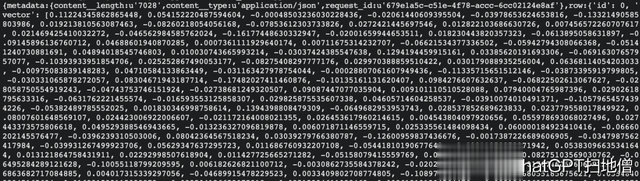
import pymochowfrom pymochow.configuration import Configurationimport config # 导入配置文件config_obj = Configuration(credentials=config.credentials, endpoint=config.endpoint)client = pymochow.MochowClient(config_obj)# 选择或创建数据库db = client.database("document")try: table = db.describe_table("chunks") primary_key = {'id': 0} projections = ["id", "source", "author"] res = table.query( primary_key=primary_key, projections=projections, retrieve_vector=True )except Exception as e: # 捕获所有类型的异常 print(f"Error: {e}") # 打印异常信息print(res)client.close()结果显示如下:
2、基于向量的检索
import osimport configimport pymochowimport qianfanfrom pymochow.configuration import Configurationfrom pymochow.model.table import AnnSearch, HNSWSearchParams# 初始化千帆AI平台的嵌入模型对象emb = qianfan.Embedding()# 定义待查询的问题文本question = "讲解下大模型的发展趋势"# 获取问题文本的嵌入向量resp = emb.do(texts=[question])question_embedding = resp['data'][0]['embedding']# 使用配置信息初始化向量数据库客户端config_obj = Configuration(credentials=config.credentials, endpoint=config.endpoint)client = pymochow.MochowClient(config_obj)# 选择数据库db = client.database("document")try: # 获取指定表的描述信息 table = db.describe_table("chunks") # 构建近似最近邻搜索对象 anns = AnnSearch( vector_field="vector", # 指定用于搜索的向量字段名 vector_floats=question_embedding, # 提供查询向量 params=HNSWSearchParams(ef=200, limit=1) # 设置HNSW算法参数和返回结果的限制数量 ) # 执行搜索操作 res = table.search(anns=anns) # 打印搜索结果 print(res)except Exception as e: # 捕获并打印所有异常信息 print(f"Error: {e}")# 关闭客户端连接client.close()3、基于标量和向量的混合检索
import osimport configimport pymochowimport qianfanfrom pymochow.configuration import Configurationfrom pymochow.model.table import AnnSearch, HNSWSearchParams# 初始化千帆AI平台的嵌入模型对象emb = qianfan.Embedding()# 定义待查询的问题文本question = "讲解下大模型的发展趋势"# 获取问题文本的嵌入向量resp = emb.do(texts=[question])question_embedding = resp['data'][0]['embedding']# 使用配置信息初始化向量数据库客户端config_obj = Configuration(credentials=config.credentials, endpoint=config.endpoint)client = pymochow.MochowClient(config_obj)# 选择数据库db = client.database("document")try: # 获取指定表的描述信息 table = db.describe_table("chunks") # 构建近似最近邻搜索对象 anns = AnnSearch( vector_field="vector", # 指定用于搜索的向量字段名 vector_floats=question_embedding, # 提供查询向量 params=HNSWSearchParams(ef=200, limit=1), # 设置HNSW算法参数和返回结果的限制数量 filter="author='CNKI'" # 提供标量的过来条件 ) # 执行搜索操作 res = table.search(anns=anns) # 打印搜索结果 print(res)except Exception as e: # 捕获并打印所有异常信息 print(f"Error: {e}")# 关闭客户端连接client.close()当然后续还需要上下文融合和答案生成,可以基于百度文心大模型的能力实现,本文篇幅有限就不详细展开了。
